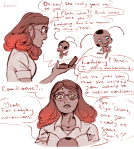
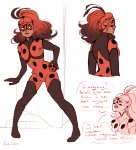
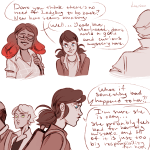
So, yeah, after that dream I really wanted to do something with LB!Alya idea. Like Marinette gave up on trying to be a Ladybug (in Origins) and Alya had a chance to find a box with miraculous in her bag where Mari left it.
And gosh, its illegal for me to do designs. Also coming up with lame hero names.
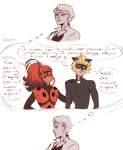
Bonus and let Marinette have some rest:
Maybe some time later Chat decides to give her Bee miraculous if Alya would let him to make a choice and Marinette would be 1000% done
There are no stupid questions, only stupid people who use regular rubber bands to tie their hair.
Bill doesn’t usually take out the rubber band unless it breaks, so it’s pretty rare to see him with his hair down. He only washes it (water, no soap) if he gets blood or something smelly in it. It’s a rat’s nest.
this is a bit of an emergency
BAD NEWS AHEAD
If you use Tumblr, backup your stuff right now and make a post redirecting your followers to another account, Twitter or something like that
Apple removed Tumblr from the App Store because their porn bot problem got too big, and they don’t allow explicit NSFW apps
Tumblr, like the galaxy-brained geniuses they are, are going on a spree and deleting lots of NSFW blogs
Even famous artists like cutesexyrobots and eigaka got their blogs purged, so ACT QUICK
Hey fellow creators! So, as some folks may have recently become aware, Tumblr posts with external links don’t show up in relevant tags (as detailed in this post). IE, if you post a Steven Universe picture and tag it “Steven Universe” and there’s an external link in the post, it won’t actually show up in the “Steven Universe” tag! This is very frustrating! What if I make a post and want to link to my Twitter in the description? What if I want to link people to my online store when I post a piece of art? What if I want to link to a YouTube video and still have it show up under the relevant tags I put into the post?
Hold on to your butts kids cuz here’s how we cheat the system.
—
The thing about Tumblr’s Anti-Linking nonsense works is that it only blocks external links. Internal links are fine. So if you wanted to post a link to another Tumblr post, or someone’s Tumblr blog, you’re good. But if you wanted to link to your Twitter page or something, you’re screwed. So, all we gotta do is make your external link into a Tumblr link. Sounds weird. I know. But here’s how it works.
First, go to your Tumblr blog. Hit the “Edit Theme” tab.
In the theme editor sidebar, scroll all the way to the bottom, the “Page” section. (Here’s what mine looks like- I already have a few of these set up)
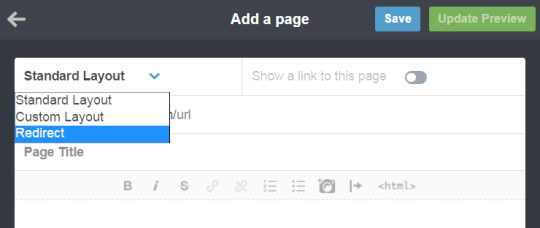
Hit “Add a Page”, and this window will pop up. By default it’s set to be a Standard Page. Hit the dropdown and select “redirect”.
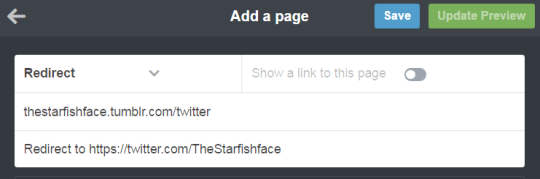
For this example, let’s say I want to link to my Twitter page. I’ll name the page “Twitter” (this is what the redirect URL will end up being- IE yourblogname.tumblr.com/Twitter), and insert my Twitter URL under the “Redirect To” tab. Leave “Show a link to this page” turned off. (Unless you want the link to show up on your blog, in which case, turn it on. Do what you want, I’m not your mom)
Hit “Save”, and your new page should now show up on your Page list!
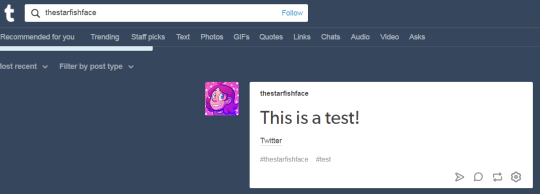
And done! So now, let’s say I wanted to use the new link in the text portion of a post. Simply use the Tumblr redirect link instead of the direct URL! As a test, I linked to my Twitter in a test post, using the redirect link instead of the direct link, and there it is in the tag! Success!
I recommend making a Redirect Page for any external links you’ll be using frequently. I like to post links to my webcomic/Twitter in posts fairly often, but doing that made me take a pretty big hit since my posts wouldn’t show up in tags. With this method, I can keep the external links, and have stuff show up when I tag it! Workarounds are fun!










 Mathee's Blog